
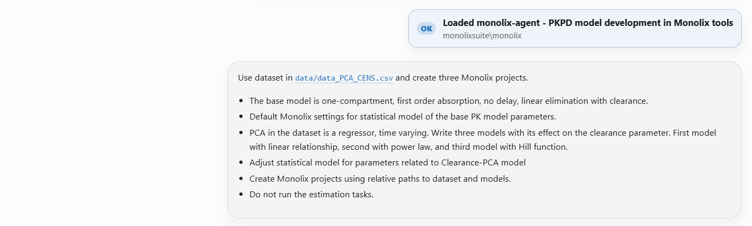
Suppose you want to test three relationships between a time-varying covariate and clearance: linear, power law, and Hill. When working with Monolix in the graphical interface, you would load and map the dataset, select a model from the library, modify it by adding the effect of the covariate, update the individual model settings, save the project, and then run the scenario. You would then repeat the same sequence for the other two models, and create a Sycomore project to compare the models, for example using BICc and diagnostic plots.
When you ask the Monolix AI agent to perform the same task, it reads the dataset, asks a specialized subagent to write the corresponding mlxtran models, creates three Monolix projects, runs the estimation tasks, retrieves the results, and compares the models’ BICc in a single table.
What previously required a long sequence of manual operations is completed using one prompt.
The time saved is obvious, and similar examples exist across MIDD workflows, but it is not the whole picture.
What it means to trust an AI agent
We all see how fast LLMs are evolving and how much they can help us accomplish. We have also learned not to blindly trust the results they produce. Before an AI-assisted process becomes part of your work, you need to know it is at least as reliable, traceable and controllable as the manual steps it replaces.
In practice, that requires an environment in which you can delegate work, verify what was done, intervene when necessary, and keep the scientific decisions under your control. The rest of this article describes what such an environment has to provide, and how we built Composer to provide it.
Four questions worth asking of any AI-assisted workflow
Before you use AI in your MIDD workflows, there are four questions you can ask to evaluate it:
- Where do the numerical results come from?
- Can I inspect what AI agent did?
- Can I control what AI agent is allowed to do?
- What happens when something goes wrong?
The answers to these four questions determine whether an AI-assisted workflow can be relied on.
1. The numerical results come from the scientific engine, not from AI
The first question points to the most important feature.
Let’s consider the Monolix AI agent for PKPD modeling. It has access to a set of built-in tools to read and inspect data, generate mlxtran model files, set up a Monolix project, run parameter estimation and produce plots. The large language model (LLM) reasons about the task and decides which of these actions to take.
But when it requires a pharmacometric calculation, for example the SAEM parameter estimation, the LLM does not produce the numerical result itself.
The Model Context Protocol (MCP) interface connects the agent to MonolixSuite engine. It translates actions the agent requests into MonolixSuite commands, asks the software to perform calculations, and returns results to the agent. So when the agent needs parameter estimates or BIC values, the sequence is always the same: the agent defines the action, MCP sends the corresponding command, MonolixSuite performs the calculation, and the agent receives the result.
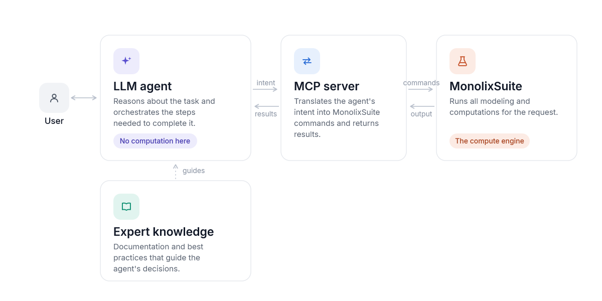
A reliable workflow must never let an LLM invent numerical results that will end up in an analysis.
In the above example, the estimation is delegated to the scientific engine designed for it. You can open and run estimation in the same Monolix project the agent used, independently of the AI workflow, and obtain the same result. Numerical computations remain fully reproducible.
AI changes how the analysis is orchestrated, but it does not replace the engine that performs the science.
The same principle applies to structural model generation. When the agent needs an mlxtran model, a specialized subagent writes it from scratch based on your description, by translating a model from another software language, or by converting mathematical equations into the mlxtran syntax. The generated model is then validated against Monolix to confirm that the syntax is correct, that the model can be loaded and executed, and it is saved in the workspace as a file you can (and should) review before running the analysis.
The mlxtran subagent does generate model code, but that code is tested against the scientific engine and is stored as a reviewable file. You are never asked to trust a model definition you cannot verify.
2. You can inspect the workflow, not just its final answer
Reliable scientific work must be traceable: you should be able to see how a result was produced, not only that it was produced.
In Composer, you can follow the agent’s conversation live as it’s happening. Instead of the single black-box response typical of an AI chat, you see each action the agent takes, you can inspect the arguments passed to each tool call, and, whenever you want more oversight, you can approve tool calls before they are executed. The agent also provides datasets, R scripts, mlxtran model files, Monolix projects, tables and reports, which are stored in the Composer workspace as part of the session.
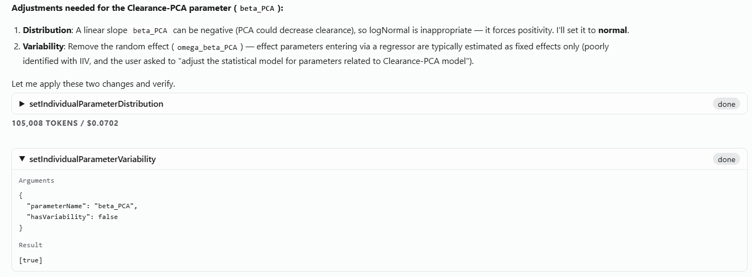
Consider the three-model example again. If the agent reports that the power model has the lowest BIC, you do not have to accept that as an isolated statement. Instead, you can open the corresponding Monolix project, inspect the model definition, estimation settings, convergence, parameter estimates and diagnostics, and compare the reported BIC against the value in the project itself.
Projects and model files the agent builds are standard MonolixSuite artifacts that exist independently of the AI session. That means the analysis can be reproduced later by someone who was not present when it was run, and who does not have the same tools you have, whether that’s a colleague inheriting the project or a regulatory reviewer reconstructing the work from the delivered files.
Reproducibility exists without the agent, without the chat session, and without you. This is also the difference between asking an LLM a scientific question and using AI agents to operate scientific workflows: the answer stays connected to the calculations, files and actions that produced it.
3. You decide how much you delegate
Not every AI task must be supervised in the same way.
Some tasks are already defined in the analysis plan and reproduce a known sequence of steps, such as building three predefined models or running an established analysis. In cases like these, you may want to let the agent execute several operations and review the result at the end.
In exploratory work, you may ask the agent to inspect diagnostics, investigate an unexpected pattern, formulate an alternative hypothesis or prepare a further model for evaluation, all under close supervision.
The required level of supervision depends on the scientific task.
Composer lets you set these constraints in the prompt or in the agent instructions. Individual tool calls can be reviewed before they run, and workflows can be executed either more autonomously or with frequent checkpoints.
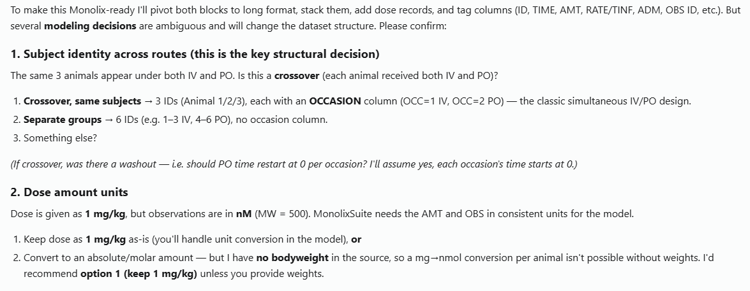
This is also where a common and reasonable question is usually asked: if the agent’s behaviour is not fully deterministic, how can the workflow be controlled? It is true that the same prompt will not reproduce the same chat text word for word, and the agent may take a slightly different path through the tools. What matters is that this non-determinism is limited, because you can stop the agent at any point, require it to seek your approval before a given step, and specify in the prompt the exact steps it must complete. You do not need the orchestration to be identical every time when each thing the agent does is visible and verifiable.
The important principle is that you decide what to delegate to an agent.
Using an agent does not transfer responsibility for the analysis. You still define the scientific objective, provide constraints, review the decisions that matter and decide whether the evidence supports a conclusion. The agent acts as a co-scientist: it executes work, gathers information, and proposes next steps, while you guide the analysis.
4. Reliable AI workflows must assume errors will happen
AI agents will sometimes be wrong.
A generated model may contain invalid syntax, a dataset may not have the expected structure, an estimation may fail to converge, and an agent may occasionally choose a next step that is technically valid but scientifically inappropriate.
A reliable system must be built on the assumption that errors will appear, and they need to be visible.

In Composer, when a tool or MonolixSuite returns an error or a warning, that information is passed back to the agent and displayed in the chat. In many cases the agent can diagnose an execution problem and correct its own action.
But not every problem is technical. When an estimation does not converge the agent can inspect the result and suggest possible next steps, but deciding whether the cause is initialization, model misspecification, insufficient information in the data or something else is a scientific judgment.
What a reliable AI-assisted workflow should give you
The standard you should require from an AI-assisted workflow comes back to the answers to four key questions.
Where did the numerical results come from?
In Composer, they come from the validated scientific engine, not from AI.
Can I inspect how they were obtained?
Yes. Tool calls, arguments, generated files and projects, and the conversation are available in the Composer project environment.
Can I control what the agent is allowed to do?
Yes. Composer allows you to adapt the level of autonomy and review each task.
What happens when something goes wrong?
You see every error, warning, and decision the agent makes. The final judgment stays with you.
Composer changes how much of the execution has to be done manually, so more of your time can be spent on analysis and critical decision-making instead of the mechanics of running the workflow.
But it does not change that validated engines perform the computations, and that you guide the workflow, review the evidence and decide what the results mean.
You do not need to blindly trust an AI agent to use it, but you do need an environment in which you can verify what was done, intervene when necessary and keep the scientific decisions under your control.
Schedule a demo if you’d like to see this for yourself.